Hot Swap
| Country of origin | United States |
|---|---|
| First created | 1990s |
| Original use | High-availability server components |
| Frame rate delivered | Not applicable (component function) |
| Component function | Allows replacement without powering down system |
| Electrical interface | Uses spring-loaded contacts |
| Typical application | Server backplanes, industrial computing |
Origin and history
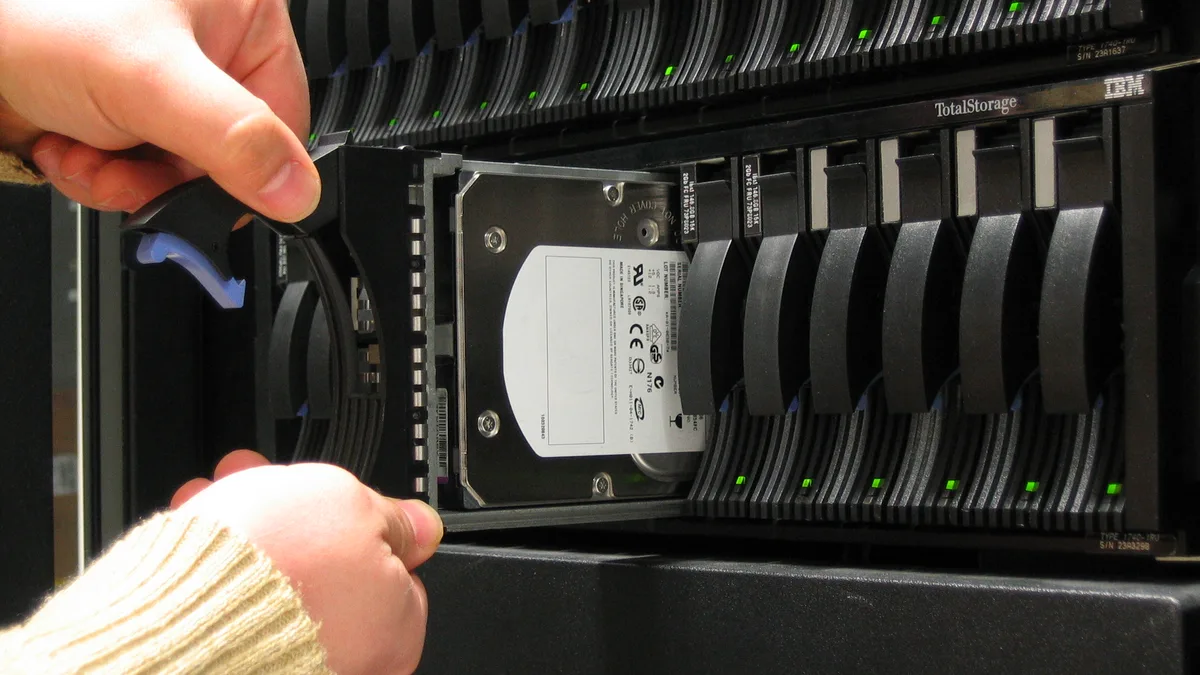
Hot swap technology originated in enterprise and industrial computing environments during the late 20th century. Its development was driven by the need for high-availability systems that could not afford downtime for maintenance or component replacement. The concept allowed technicians to replace faulty hardware components, such as hard drives or power supplies, while the system remained powered on and operational. This technology migrated from servers and data centers into the consumer electronics and PC hardware markets in subsequent decades. The fundamental principle involves specialized connectors and circuitry that manage the electrical connection and disconnection process safely. Its adoption in consumer peripherals, particularly mechanical keyboards, became widespread in the 2010s as a user-friendly feature.
What it is designed for
Hot swap functionality is designed to allow users to replace electronic components without needing to power down the entire system. In the context of PC components and peripherals, it eliminates the need for soldering by using sockets that accept component leads. This design prioritizes ease of maintenance, customization, and longevity of the host device. For mechanical keyboards, it enables users to exchange switches to alter typing feel and acoustics without specialized tools or technical skill. In PC building, it is commonly applied to fan headers, RGB controllers, and certain storage interfaces to facilitate easy upgrades or troubleshooting. The core design intention is to reduce system downtime and lower the barrier to entry for hardware modification.
Development and versions
The development of hot swap standards has been iterative, with versions defined by their electrical specifications and physical connector designs. Early implementations were proprietary, varying between server manufacturers like IBM, HP, and Dell for their specific drive bays and backplanes. The standardization for storage came with the widespread adoption of Serial ATA (SATA) and later, Serial Attached SCSI (SAS), which included formal hot plug specifications. In the mechanical keyboard community, the development has centered on socket types, primarily the "Kailh Hotswap Socket" and "Outemu Hotswap Socket," which differ in pin compatibility and physical footprint. More recent developments include the "Mill-Max" socket system, which involves press-fit sockets that can be added to standard printed circuit boards. The evolution continues with sockets designed for new switch pin layouts and low-profile switch form factors.
Best Hot Swap for gaming
The best hot swap implementation for gaming depends on the component category, as the term "hot swap" does not directly correlate to frame rate. For gaming keyboards, a hot swap PCB allows gamers to experiment with different switch actuation forces and travel distances to optimize responsiveness and comfort, which can indirectly affect performance. In PC internals, hot swap-capable fan hubs or RGB controllers offer no performance benefit for frame rates but simplify cable management and component swaps during system tuning. No mainstream hot swap feature on components like GPUs, CPUs, or RAM directly increases frames per second; its value is in maintenance and incremental upgrades. The primary consideration is build quality, as poorly made sockets can lead to unreliable electrical connections over time. For a gaming build, prioritizing a hot swap keyboard for customization and a standard, high-quality motherboard for core components is the typical approach.
Hot Swap reviews
Reviews of hot swap products consistently highlight the convenience and user empowerment the feature provides. Keyboard reviews note that hot swap PCBs are a major selling point for enthusiast boards, allowing for extensive customization without soldering. Critical reviews often point out that not all sockets are equal, with some only compatible with specific switch brands or types due to variations in pin size and spacing. Reviews of hot swap fan hubs or RGB controllers praise the ease of installation and reconfiguration but sometimes criticize the added cost for a feature many users may not frequently use. A common review finding is that the durability of the sockets can vary, with some users reporting broken sockets after multiple switch swaps, while others withstand hundreds of cycles. Professional reviews typically conclude that hot swap is a valuable quality-of-life feature rather than a performance enhancer.
Overview
Hot swap is a feature that permits the installation or removal of a hardware component while the host system remains powered on. It is achieved through electrical design that safely manages the connection and disconnection process, preventing damage from arcing or inrush current. In contemporary PC building and peripherals, it is most prevalent in mechanical keyboards, internal fan control, and certain storage configurations. The feature does not inherently improve the performance metrics, such as frame rate, of the components it hosts; its benefit is purely functional and ergonomic. It represents a shift towards user-repairable and customizable hardware, extending product life and reducing electronic waste. The implementation adds marginal cost to the base product and requires careful design to ensure long-term reliability.
What to know
It is crucial to know that hot swap compatibility is not universal and requires verification between the socket and the component. Keyboard switches, for example, come with three-pin and five-pin variants, and a given hot swap PCB may only support one type without modification. The hot swap capability for internal components like SATA drives also requires support from both the hardware interface and the operating system to function correctly. Users should be aware that repeatedly swapping components can wear out the socket contacts over a long period, potentially leading to intermittent connections. The feature does not circumvent the need for proper driver installation or system recognition for new components in an operating system context. Understanding that hot swap is a convenience feature, not a performance feature, is key to evaluating its worth in a build budget.
Common questions
A common question is whether hot swapping a component can damage it or the motherboard, to which the answer is that properly designed systems prevent this, but forcing components or using incompatible parts risks damage. Users often ask if all mechanical keyboard switches are compatible with all hot swap sockets, and the answer is no, as pin layout and size differences between manufacturers like Kailh, Gateron, and Cherry require specific socket types. Many inquire if they can add hot swap sockets to an existing soldered keyboard, which is possible but requires significant technical skill and the correct socket hardware. People question if hot swap SATA ports are faster, but the interface speed is determined by the SATA generation, not the hot plug capability. Another frequent question is whether hot swap parts are more expensive, and they typically carry a small premium over their non-hot-swap equivalents due to the added connectors and circuitry.
Pros and cons
Pros: The primary advantage is unparalleled ease of customization and repair, allowing users to change components like keyboard switches or case fans in seconds without tools. It significantly lowers the barrier to entry for hardware modification, encouraging experimentation and learning. Hot swap extends the functional lifespan of a device, as a single faulty component can be replaced instead of discarding the entire unit. It facilitates faster troubleshooting by enabling component isolation and swapping without a full system power-down. Cons: The implementation adds cost to the base product, which is passed to the consumer for a feature they may rarely use. Poorly manufactured sockets, particularly on budget keyboards, can have weak contacts that fail after a few dozen swaps or cause intermittent key presses. A common mistake is assuming universal compatibility, leading users to purchase incompatible switches or drives that do not fit the socket. Users who never modify their hardware effectively pay for a feature they do not utilize, and some regret the choice when a more robust soldered connection could have been offered at a lower price point. The sockets can also add a slight height to a keyboard PCB, potentially limiting compatibility with certain low-profile cases.
Who it suits
Hot swap features suit hardware enthusiasts and tinkerers who enjoy customizing their equipment's feel and performance over time. They are ideal for users who value long-term repairability and wish to avoid soldering due to a lack of tools, skill, or confidence. PC builders who frequently test different components, such as reviewers or system integrators, benefit greatly from the reduced downtime and effort. It is less suited for users who set up a system once and never change it, as they derive no benefit from the added cost and potential reliability trade-offs. Organizations with large fleets of workstations or servers also utilize hot swap for its maintenance efficiency, though this is a different scale of implementation. Ultimately, it is a feature for those who view their hardware as a modular platform rather than a fixed appliance.